Download Microsoft office 2013 Now!

Microsoft has just released the free preview version of the all new Microsoft Office 2013. You can now download Microsoft Office 2013 immediately on your computer to try it.

How to Access Blocked Websites Without Proxy

Access your favorite blocked website and social networking sites at your or college or your workplace without proxy.Download exciting software to access blocked websites.

Make a Very Dangerous Virus with Notepad

Now make your own viruses in Notepad. Make fun with these in your friends computer.

How to remove PDF password

In some PDF files, Owner set the password to that file. It restrict the print, copy or edit the content of PDF file. In such situation PDF password remover application help you to remove password.

How to bypass Surveys on websites

Many websites makes survey to proceed the download or to visit the website. These surveys prove to b headache. To bypass these surveys, there are some tricks to follow.

Showing posts with label Google. Show all posts

Friday, 15 March 2013

Few Ways to find Google Account Creation Date

This is really an interesting question and important as well. When we lost access to our Google account and no password recovery options help us, we need Google's help. To recover our account, Google will ask few security questions. These question also include the question about your Google account creation date. If you know the exact date, probability of getting your account back is high. 
So it is highly recommended to know and remember the Google account creation date. But how to get Google account creation date? In this post, I am adding few quick ways to get the Google Account creation date and know when you came to Google services.

Check Welcome Mail

When first we create Gmail account, it sends 2 welcome messages. We can search for those emails and check the timestamp of those mails. But there may be a possibility that you have deleted those emails. I also did that. So you can follow other quick ways.

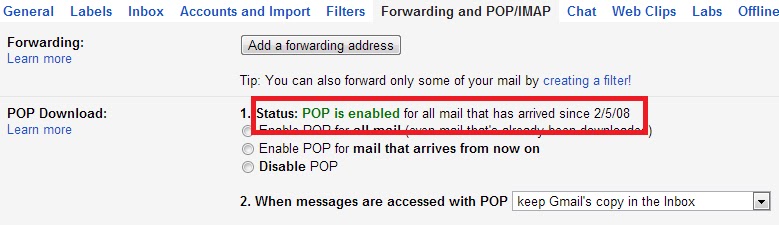
Check POP/IMAP settings

This also a way to check the Gmail account creation date. Go to settings in Gmail and then inForwarding and POP/IMAP tab. Here you will find a line saying POP is enabled for all mail that has arrived since dd/mm/yy. But this info may be wrong in case you have disabled the pop and then re-enabled it. If you have never changed this setting, it will show the date of account creation. Otherwise, it will show the date when you last enabled the POP for this account.

Use Google Takeout

 find Google Account Creation Date
Google takeout is a nice Google service that allow users to take backup of your Google accounts data. Follow these steps
  • Go to google.com/takeout and sign in with your Google Account.
  • Now click on "Transfer your Google+ connections to another account."
  • It will ask for the password again and then show a page that will show you the Google Account creation date.
Now you know the date. Remember it and save it. This can be useful in future. while account verification.

Search